

Inspired by shamanic songs, I decided to test the new version of LTX-2.3 on different graphics cards. Imagine if you think I have a 4090 with a big smile – no, I’ve been doing everything via the cloud on immers.cloud for a long time, where I run several GPUs—from 3090 to H200. During testing, I create a virtual server, launch the necessary processes, and destroy it after a minute, while the disk image remains untouched. All this is done so quickly that switching from one card to another takes just a minute—simply press F5 in the browser where the command interface is open.
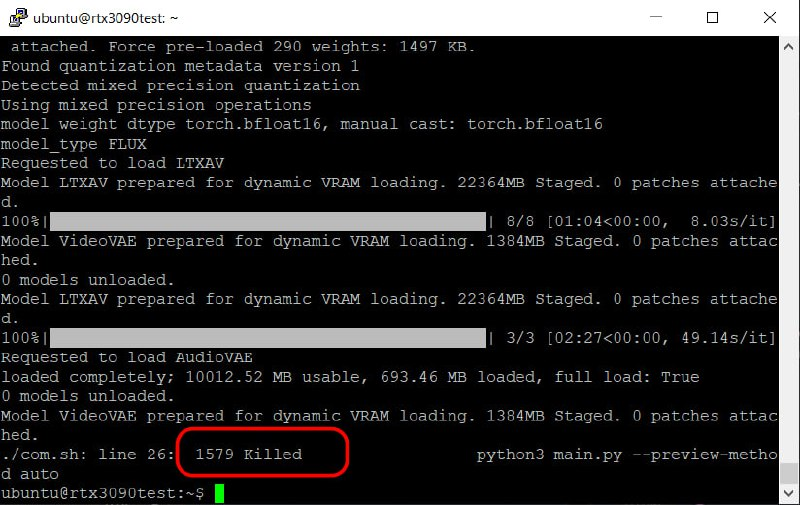
First, I set up a server based on the 3090 and launched a test model—immediately crashing on VAE Decode. Although this card also has 24 GB of VRAM, like the 4090. I decided to reduce the resolution to 720p—same result: crash. Then I lowered processing seconds from 15 to 10—still a failure. Only five seconds at 720p are considered normal for this test.
I was a bit confused. On another system with a 4090 and the same amount of VRAM, processing comfortably takes 15 seconds at 1080p, but with the same memory, I can only do 720p in five seconds. Plus, they run Windows, while I use Linux.
ChatGPT tries to explain the situation with strange theories: that Windows drivers cleverly offload parts of VRAM into RAM (which sounds almost like fantasy), but on Linux, the process just gets “killed.” But as it turned out later, this was complete nonsense. Then it started reasoning about second-level cache for Ada Lovelace (4090) and criticizing Ampere (3090). It also suggested some secret flags for running Comfy—tried applying them, but nothing helped.
I began adjusting configuration parameters: tile size, overlaps in VAE Decode, experimenting with environment variables like:
export PYTORCH_ALLOC_CONF=backend:cudaMallocAsync
export TORCH_CUDA_ARCH_LIST
export TORCH_FLOAT32_MATMUL_PRECISION
But even that didn’t produce results. And then I suddenly noticed an important detail: when launching from the command line, a “Killed” message appears, not an error like “Cuda OOM Error.” This indicates that the problem is specifically with insufficient RAM—not VRAM.
And then I realized my mistake—when setting up the server, I allocated too little RAM. After a full system reboot with 128 GB of RAM and a new configuration based on the same 3090, everything worked perfectly. Now VAE Decode reliably runs even at 1080p resolution with a processing time of 15 seconds.
The conclusion is simple: more RAM is better for these tasks. No unnecessary hassle!
I’ll continue testing other graphics cards—stay tuned for updates.
Created with n8n:
https://cutt.ly/n8n
Created with syllaby:
https://cutt.ly/syllaby